
Skip to main content
Info icon description text
Welcome to our Knowledge Base
-
What’s New
- August 25, 2026 – Clone/Move Fixes, Teams Tab Admin Consent, and Dashboard Fixes
- August 11, 2026 – Kind-Name Labels, Cascading Wizard Fixes, and Platform Polish
- May 12, 2026 – Archive Items, Clone/Move Plans, Copilot Improvements, and Platform Updates
- March 20, 2026 – Import from Planner, OKR Improvements, VisPlan Portal & Plan Improvements
- February 16, 2026 – Progress Improvements, and Platform Stability
- 19 December, 2025 – Jira Integration, Matrix Progress, Mobile Experience, and Plan Overview Enhancements
- 5 December, 2025 – Enhanced Mobile Experience, Improved Collaboration Tools, and Platform Stability
- 30 October, 2025 – In‑Meeting Collaboration, Tags & Planner Sync, Checklists and Templates, and Matrix Improvements
- 30 September, 2025 – Combined Consent Form, Unified Sort Order, and Copilot Improvements
- 15 September 2025 – Enhanced Copilot Chat, Model Selection, and Permissions Update
- 16 July, 2025 – New Languages, Meeting Sharing, and Improved Onboarding
- 28 May 2025 - Improved In-Plan Copilot, new plan statistics and support for Outlook
- 17 April 2025 - Auto Create Sub Plans and Share OKRs in Plan Hierarchy
- 28 February 2025 - Comments feature and Enhanced Gantt Zooming
- 30 December 2024 – link to Objects, Delete plan connections, Library Upgrades, and Support for cloud.microsoft
- 4 October 2024 – VisPlan Copilot & User Rights Management
- 30 April 2024 – Visual Filter
- 12 April, 2024 – Excel Integration for OKRs
- 14 February 2024 – Exciting Updates: Introducing the E-bike Sample Plan, Improved OKR Structure, and Focus Dates
- 30 October 2023 - Improved alignment of Capability lines and bug fixes
- 2 October 2023 - New Feature: OKR View
- 21 August 2023 - Hierarchy View Feature
- 6 April 2023 - Matrix Upgrade, Sidebar Focus Grouping, and Organization Templates
- 3 March 2023 - Matrix Improvements, Assignee on Ambitions, Custom Thresholds, and Generate Gantt PDF
- 10 February 2023 - Faster Syncing with Microsoft Planner and Azure DevOps
- 12 Jan 2023 - DevOps Custom Work Item Types and Budget Key Result/KPI
- 5 Dec 2022 - Maintenance Release
- 22 Nov 2022 - Resize Drawing Area and Group Actions by Focus
- 8 Nov2022 - Assignees on objects and associate Focus with Key Result
- 28 Oct 2022 - Add Backgrounds and Move KPIs
- 22 Sep 2022 - Updated New Plan Wizard with Sample Plan and Text object
- 8 September 2022 - List View and Create New Plan Wizard
- 5 Jul 2022 - User interface and framework upgrades
- 7 Jun 2022 - Navigate to linked plan
- 27 May 2022 - OKRs, Focus improvement, Progress indicators and more
- 11 Apr 2022 – DevOps, Checklist view and Manual reload inherited data
- 15 Mar 2022 – Version History
- 25 Feb 2022 – All your plans in the Personal tab
- 31 Jan 2022 - Swedish language and Profile picture
- 26 Nov 2021 - New Gantt view and completed Actions
- 22 Oct 2021 - Integration with Microsoft Planner
- Show more... (26) Collapse Articles
-
Getting Started
-
Using VisPlan
- How to Use the Gantt View in VisPlan
- How to Use Tags in VisPlan
- How to Use In-meeting Collaboration with VisPlan in Microsoft Teams
- Manage VisPlan Hierarchy - Generate Sub Plans from Master Plan
- How to Disconnect and Delete a Microsoft Planner Plan Connected to VisPlan
- How to Delete a VisPlan Plan in Microsoft Teams
- The VisPlan Edit Mode: Optimizing Your Plan’s Visual Layout
- How to View All Actions Planned Between Two Dates in VisPlan
- How to use the List View
- How to use Excel for OKRs
- How to use the OKR View
- How to use the Hierarchy View
- How to Use Attachments in VisPlan
- Using the Matrix View
- Working with Capabilities and Ambitions
- Progress Calculations
- Show more... (1) Collapse Articles
-
FAQs
- Articles coming soon
-
Integrations
-
Other
Print
5 December, 2025 – Enhanced Mobile Experience, Improved Collaboration Tools, and Platform Stability
Posted
Updated
Mobile Experience Improvements
- Pinch-to-Zoom on Android: Pinch-to-zoom on Android now works seamlessly across charts, diagrams, and plan views with better responsiveness, bringing Android feature parity with iOS.
- Touch-optimized interactions: Long-tap gestures replace traditional right-click menus, providing intuitive context menu access on touch devices
- Improved sidebar accessibility: The sidebar is now automatically minimized in edit mode on mobile, maximizing screen real estate for focused editing
- Mobile toolbar improvements: Font selector and editing controls are now properly sized and positioned on small screens
- Responsive design: All UI elements adapt better to portrait and landscape orientations
Collaboration & Sidebar Enhancements
- Search integration: Find specific items across your plan with an integrated search bar. Quickly locate actions, objectives, or other items.
- Resizable sidebar: Drag to adjust the sidebar width for your preferred viewing balance
- Plan statistics panel: Click the plan title to view plan vitals—counts of each object type and action status
Accessibility & UI Polish
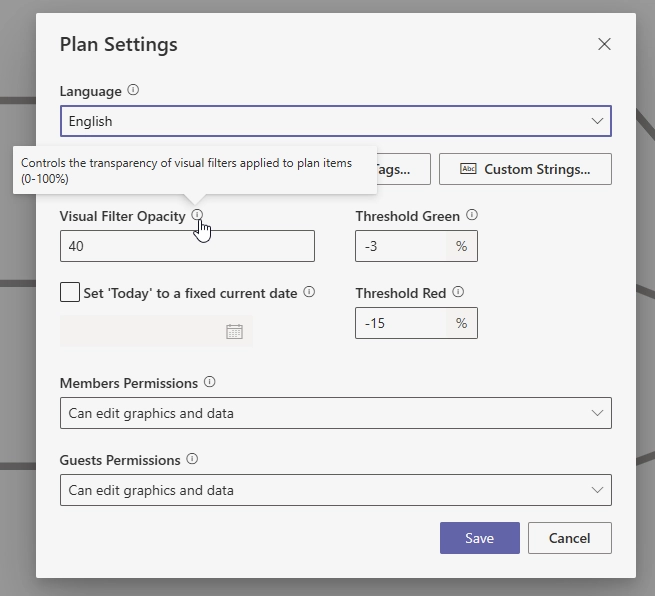
- Info icons and tooltips: Hover over (i) icons throughout the interface for contextual help. Over 130 help points across the application make VisPlan more self-explanatory.
- Navigation improvements: OKR cards now display navigation icons to navigate to the item in the Plan view
- Improved error messaging: DevOps integration errors now display user-friendly messages with actionable guidance
- Fixed-date notifications: Get notified by a banner when opening a plan with a fixed today-date activated
Plan Progress Features
- Progress display on dashboard: See the plan progress indicator directly on dashboard cards for quick visibility. Assess project health at a glance without drilling into individual plans.
- Plan-level progress tracking: Monitor overall plan completion quickly
- Progress synchronization: Progress data from sub-plans now syncs correctly to parent plans
Planner Synchronization Improvements
- Planner attachment sync: Attachments linked in Planner tasks are now synchronized with VisPlan bidirectionally.
- Checklist checkbox management: Planner checklists now properly sync checkbox state management with VisPlan
- Improved DevOps access: Better error handling and messaging when DevOps access is denied or misconfigured
- Guest user support: Planner sync now works correctly for guest accounts in the web app
- Domain authentication fixes: Fixed authentication for Planner domain scenarios
WebApp & Authentication
- OneDrive site support: Create plans in personal OneDrive sites for solo planning
- Guest user handling: Improved handling for guest users with special permission requirements